Widget
The PicPick Widget is a small floating toolbar that gives quick access to screen capture modes, recording, capture options, graphic accessories, program options, and exit.

1. Widget Buttons
The widget shows capture and tool icons in a compact row.
| Button | Purpose |
|---|---|
| Full Screen | Captures the full screen. |
| Window | Captures a selected window. The icon includes a dropdown arrow for more choices. |
| Region | Captures a rectangular region selected by dragging. |
| Fixed Region | Captures a predefined-size rectangle. |
| Window Control | Captures a specific control or UI element inside a window. |
| Scrolling Window | Captures scrollable content. |
| Freehand | Captures a hand-drawn region. |
| Repeat Last Capture | Repeats the previous capture mode. |
| Screen Recorder | Starts the screen recording workflow. |
| Capture Options | Opens capture-related settings from the gear menu. |
| Tools / Graphic Accessories | Opens the tools menu from the wrench icon. |
2. Tools Menu
Click the wrench icon to open the tools menu.
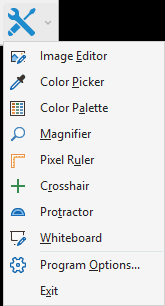
| Menu item | Purpose |
|---|---|
| Image Editor | Opens the PicPick editor. |
| Color Picker | Picks a color from the screen. |
| Color Palette | Opens color palette tools. |
| Magnifier | Magnifies pixels on the screen. |
| Pixel Ruler | Measures screen dimensions. |
| Crosshair | Shows screen coordinates and alignment guides. |
| Protractor | Measures screen angles. |
| Whiteboard | Opens the whiteboard drawing tool. |
| Program Options... | Opens the Program Options window. |
| Exit | Closes PicPick. |
3. Capture Options and Widget Options Menu
Click the gear icon to open capture and widget options.
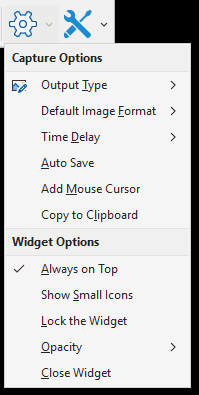
3.1 Capture Options
| Menu item | Purpose |
|---|---|
| Output Type | Selects where captured images are sent. |
| Default Image Format | Selects the default capture image format. |
| Time Delay | Sets the capture delay. |
| Auto Save | Toggles automatic saving. |
| Add Mouse Cursor | Includes or excludes the mouse cursor. |
| Copy to Clipboard | Copies captures to the clipboard. |
3.2 Widget Options
| Menu item | Purpose |
|---|---|
| Always on Top | Keeps the widget above other windows. The screenshot shows this enabled. |
| Show Small Icons | Changes the widget to use smaller icons. |
| Lock the Widget | Prevents the widget from being moved accidentally. |
| Opacity | Adjusts the widget transparency. |
| Close Widget | Hides or closes the widget. |