试用新版 PicPick Beta
在稳定版发布前试用新一代 PicPick。下载 Beta 版,探索新功能并分享反馈。
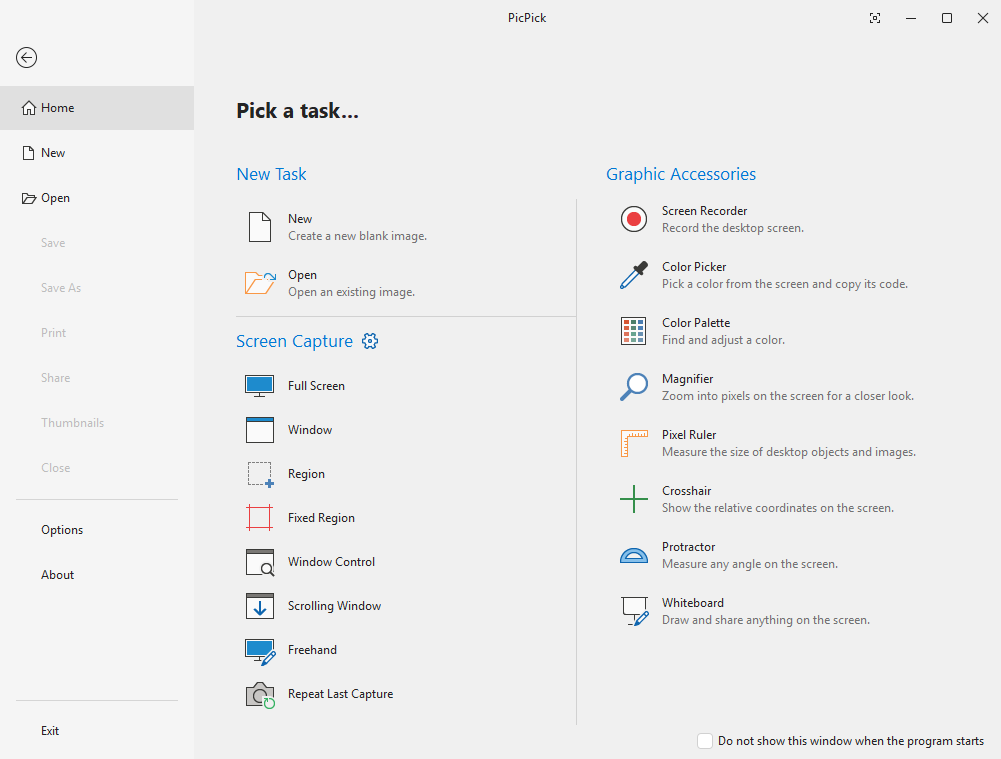
新增内容
本次 Beta 的重点功能
下一稳定版本主要变化的快速概览。
常规
- 支持 64 位架构
- 保存并编辑透明 PNG
- 全新的 .picpick 文件格式:保存后形状和图层仍可编辑
- 自由角度旋转图像
- 带即时预览的捕获通知弹窗
- 改进的光标图章,支持高亮背景
绘图和修饰
- 新增绘图模式:柔和画笔、书法和喷枪
- 新增修饰效果:涂抹、马赛克、扭曲、模糊和锐化
- 透明橡皮擦和透明填充工具
- 填充和魔棒工具的容差控制
- 草图橡皮擦:恢复原始图像,仅擦除您绘制的内容
选择工具
- 新增选择工具:椭圆、自由选择和魔棒
- 反转选择选项
- 将选择区域转换为独立图层,以便单独应用效果
- 重置单个图层上的效果
文本和形状
- WordArt 风格渐变文本
- 快速菜单,便于快速更改文本样式
- 新增 20 多种形状和箭头
- 形状背景的渐变填充
- 多个形状和图层的精确对齐
- 改进形状阴影效果
- 可编辑节点的折线与多边形工具
- 重新设计的标注气泡,带有逼真的尾巴
发行说明
v8.0.0-beta10v8.0.0-beta10 (2026-09-16)
Beta 10 Key Improvements
- Screen Recorder: added Pause, webcam overlay, mouse effects, countdown, and a new options dialog (see 7.6.1 notes).
- Shift+drag now snaps lines to 45° angles.
- Copying from the tab menu now includes all layers.
- Includes all 7.6.1 fixes (HEIF support, printing, capture, and crash fixes).
Beta 9 Key Improvements
- Capture notification popup: a preview card now appears after each capture.
- Added the Sketcher Eraser, a restore-to-original eraser that removes only drawn marks, not the underlying image.
- Added Single and Double Curved Line tools.
- Added a Polyline/Polygon tool: click to create connected segments, close the path to form a polygon, and drag individual points afterward.
- Added a Center Guide overlay for aligning content.
- Improved the Cursor Stamp with a highlight background selector.
- Improved the Callout shape to look more like a real speech balloon.
- Added dotted and dashed line styles for shapes.
- Improved empty-area detection for shapes so they no longer move when clicking inside an empty area.
- Text Editor: Ctrl+Backspace now deletes the previous word, and callout bubbles have been redesigned with shorter tails and rounded corners.
- Improved Ctrl+C / Ctrl+V behavior to properly copy and paste layers and objects.
- Fixed an issue where pasting a transparent PNG caused it to lose its transparency.
- Added the ability to duplicate a shape by Ctrl+dragging.
- Fixed an issue where cropping left a one-pixel line along the right and bottom edges.
版本
稳定版v7.6.1
Betav8.0.0-beta10
系统要求
操作系统所有 Windows 版本
架构x86 / x64
内存512 MB 或以上
存储空间约 250 MB
Beta 计划
使用前须知
Beta 版本可让你最早体验新功能,但也会有取舍。安装前请了解以下事项。
抢先体验
在稳定版发布前数周获取新功能。Beta 版本会随着开发进度频繁更新。
帮助我们改进
你的反馈会直接影响最终版本。报告错误、提出调整建议,并影响面向所有用户发布的内容。
可能存在不完善之处
Beta 版本可能包含错误或未完成的功能。不建议在关键生产流程中使用。

试用新版 PicPick Beta
在稳定版发布前试用新一代 PicPick。下载 Beta 版,探索新功能并分享反馈。
新增内容
本次 Beta 的重点功能
下一稳定版本主要变化的快速概览。
常规
- 支持 64 位架构
- 保存并编辑透明 PNG
- 全新的 .picpick 文件格式:保存后形状和图层仍可编辑
- 自由角度旋转图像
- 带即时预览的捕获通知弹窗
- 改进的光标图章,支持高亮背景
绘图和修饰
- 新增绘图模式:柔和画笔、书法和喷枪
- 新增修饰效果:涂抹、马赛克、扭曲、模糊和锐化
- 透明橡皮擦和透明填充工具
- 填充和魔棒工具的容差控制
- 草图橡皮擦:恢复原始图像,仅擦除您绘制的内容
选择工具
- 新增选择工具:椭圆、自由选择和魔棒
- 反转选择选项
- 将选择区域转换为独立图层,以便单独应用效果
- 重置单个图层上的效果
文本和形状
- WordArt 风格渐变文本
- 快速菜单,便于快速更改文本样式
- 新增 20 多种形状和箭头
- 形状背景的渐变填充
- 多个形状和图层的精确对齐
- 改进形状阴影效果
- 可编辑节点的折线与多边形工具
- 重新设计的标注气泡,带有逼真的尾巴
发行说明
v8.0.0-beta10v8.0.0-beta10 (2026-09-16)
Beta 10 Key Improvements
- Screen Recorder: added Pause, webcam overlay, mouse effects, countdown, and a new options dialog (see 7.6.1 notes).
- Shift+drag now snaps lines to 45° angles.
- Copying from the tab menu now includes all layers.
- Includes all 7.6.1 fixes (HEIF support, printing, capture, and crash fixes).
Beta 9 Key Improvements
- Capture notification popup: a preview card now appears after each capture.
- Added the Sketcher Eraser, a restore-to-original eraser that removes only drawn marks, not the underlying image.
- Added Single and Double Curved Line tools.
- Added a Polyline/Polygon tool: click to create connected segments, close the path to form a polygon, and drag individual points afterward.
- Added a Center Guide overlay for aligning content.
- Improved the Cursor Stamp with a highlight background selector.
- Improved the Callout shape to look more like a real speech balloon.
- Added dotted and dashed line styles for shapes.
- Improved empty-area detection for shapes so they no longer move when clicking inside an empty area.
- Text Editor: Ctrl+Backspace now deletes the previous word, and callout bubbles have been redesigned with shorter tails and rounded corners.
- Improved Ctrl+C / Ctrl+V behavior to properly copy and paste layers and objects.
- Fixed an issue where pasting a transparent PNG caused it to lose its transparency.
- Added the ability to duplicate a shape by Ctrl+dragging.
- Fixed an issue where cropping left a one-pixel line along the right and bottom edges.
版本
稳定版v7.6.1
Betav8.0.0-beta10
系统要求
操作系统所有 Windows 版本
架构x86 / x64
内存512 MB 或以上
存储空间约 250 MB
Beta 计划
使用前须知
Beta 版本可让你最早体验新功能,但也会有取舍。安装前请了解以下事项。
抢先体验
在稳定版发布前数周获取新功能。Beta 版本会随着开发进度频繁更新。
帮助我们改进
你的反馈会直接影响最终版本。报告错误、提出调整建议,并影响面向所有用户发布的内容。
可能存在不完善之处
Beta 版本可能包含错误或未完成的功能。不建议在关键生产流程中使用。