試用新版 PicPick Beta
在穩定版推出前試用下一代 PicPick。下載 Beta 版,探索新功能並分享意見。
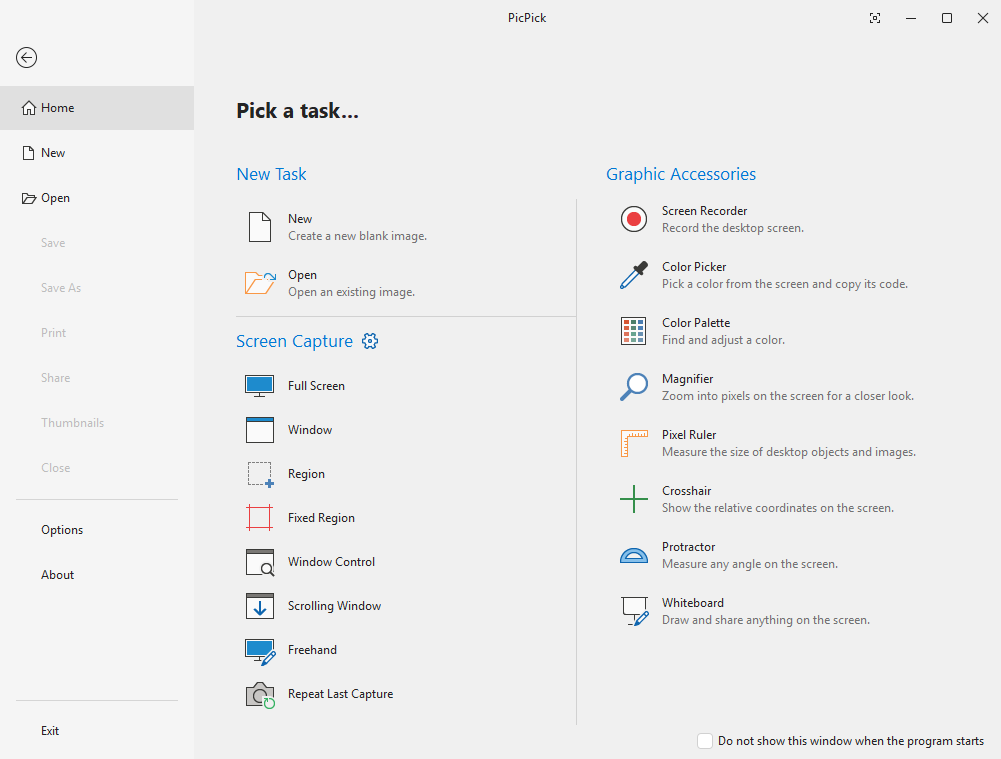
新增內容
本次 Beta 的重點功能
下一個穩定版本主要變更的快速概覽。
一般
- 支援 64 位元架構
- 儲存並編輯透明 PNG
- 全新的 .picpick 檔案格式:儲存後圖形和圖層仍可編輯
- 自由角度旋轉圖片
- 帶即時預覽的擷取通知彈出視窗
- 改良的游標圖章,支援強調背景
繪圖和修飾
- 新增繪圖模式:柔和筆刷、書法和噴槍
- 新增修飾效果:塗抹、馬賽克、扭曲、模糊和銳利化
- 透明橡皮擦和透明填滿工具
- 填滿和魔術棒工具的容差控制
- 草圖橡皮擦:還原原始影像,僅擦除您繪製的內容
選取工具
- 新增選取工具:橢圓、手繪和魔術棒
- 反轉選取範圍選項
- 將選取範圍轉換為獨立圖層,以便套用獨立效果
- 重設個別圖層上的效果
文字和圖形
- WordArt 風格漸層文字
- 快速選單,便於快速變更文字樣式
- 新增 20 多種圖形和箭頭
- 圖形背景的漸層填滿
- 多個圖形和圖層的精準對齊
- 改進圖形陰影效果
- 可編輯節點的折線與多邊形工具
- 重新設計的註解方塊,帶有逼真的尾巴
版本說明
v8.0.0-beta10v8.0.0-beta10 (2026-09-16)
Beta 10 Key Improvements
- Screen Recorder: added Pause, webcam overlay, mouse effects, countdown, and a new options dialog (see 7.6.1 notes).
- Shift+drag now snaps lines to 45° angles.
- Copying from the tab menu now includes all layers.
- Includes all 7.6.1 fixes (HEIF support, printing, capture, and crash fixes).
Beta 9 Key Improvements
- Capture notification popup: a preview card now appears after each capture.
- Added the Sketcher Eraser, a restore-to-original eraser that removes only drawn marks, not the underlying image.
- Added Single and Double Curved Line tools.
- Added a Polyline/Polygon tool: click to create connected segments, close the path to form a polygon, and drag individual points afterward.
- Added a Center Guide overlay for aligning content.
- Improved the Cursor Stamp with a highlight background selector.
- Improved the Callout shape to look more like a real speech balloon.
- Added dotted and dashed line styles for shapes.
- Improved empty-area detection for shapes so they no longer move when clicking inside an empty area.
- Text Editor: Ctrl+Backspace now deletes the previous word, and callout bubbles have been redesigned with shorter tails and rounded corners.
- Improved Ctrl+C / Ctrl+V behavior to properly copy and paste layers and objects.
- Fixed an issue where pasting a transparent PNG caused it to lose its transparency.
- Added the ability to duplicate a shape by Ctrl+dragging.
- Fixed an issue where cropping left a one-pixel line along the right and bottom edges.
版本
穩定版v7.6.1
Betav8.0.0-beta10
系統需求
作業系統所有 Windows 版本
架構x86 / x64
記憶體512 MB 或以上
儲存空間約 250 MB
Beta 計畫
使用前須知
Beta 版本可讓您最早體驗新功能,但也會有取捨。安裝前請先了解以下事項。
搶先體驗
在穩定版推出前數週取得新功能。Beta 版本會隨開發進度頻繁更新。
協助我們改進
您的意見會直接影響最終版本。回報錯誤、提出調整建議,並影響面向所有使用者推出的內容。
可能仍有不完善之處
Beta 版本可能包含錯誤或未完成的功能。不建議在關鍵生產流程中使用。

試用新版 PicPick Beta
在穩定版推出前試用下一代 PicPick。下載 Beta 版,探索新功能並分享意見。
新增內容
本次 Beta 的重點功能
下一個穩定版本主要變更的快速概覽。
一般
- 支援 64 位元架構
- 儲存並編輯透明 PNG
- 全新的 .picpick 檔案格式:儲存後圖形和圖層仍可編輯
- 自由角度旋轉圖片
- 帶即時預覽的擷取通知彈出視窗
- 改良的游標圖章,支援強調背景
繪圖和修飾
- 新增繪圖模式:柔和筆刷、書法和噴槍
- 新增修飾效果:塗抹、馬賽克、扭曲、模糊和銳利化
- 透明橡皮擦和透明填滿工具
- 填滿和魔術棒工具的容差控制
- 草圖橡皮擦:還原原始影像,僅擦除您繪製的內容
選取工具
- 新增選取工具:橢圓、手繪和魔術棒
- 反轉選取範圍選項
- 將選取範圍轉換為獨立圖層,以便套用獨立效果
- 重設個別圖層上的效果
文字和圖形
- WordArt 風格漸層文字
- 快速選單,便於快速變更文字樣式
- 新增 20 多種圖形和箭頭
- 圖形背景的漸層填滿
- 多個圖形和圖層的精準對齊
- 改進圖形陰影效果
- 可編輯節點的折線與多邊形工具
- 重新設計的註解方塊,帶有逼真的尾巴
版本說明
v8.0.0-beta10v8.0.0-beta10 (2026-09-16)
Beta 10 Key Improvements
- Screen Recorder: added Pause, webcam overlay, mouse effects, countdown, and a new options dialog (see 7.6.1 notes).
- Shift+drag now snaps lines to 45° angles.
- Copying from the tab menu now includes all layers.
- Includes all 7.6.1 fixes (HEIF support, printing, capture, and crash fixes).
Beta 9 Key Improvements
- Capture notification popup: a preview card now appears after each capture.
- Added the Sketcher Eraser, a restore-to-original eraser that removes only drawn marks, not the underlying image.
- Added Single and Double Curved Line tools.
- Added a Polyline/Polygon tool: click to create connected segments, close the path to form a polygon, and drag individual points afterward.
- Added a Center Guide overlay for aligning content.
- Improved the Cursor Stamp with a highlight background selector.
- Improved the Callout shape to look more like a real speech balloon.
- Added dotted and dashed line styles for shapes.
- Improved empty-area detection for shapes so they no longer move when clicking inside an empty area.
- Text Editor: Ctrl+Backspace now deletes the previous word, and callout bubbles have been redesigned with shorter tails and rounded corners.
- Improved Ctrl+C / Ctrl+V behavior to properly copy and paste layers and objects.
- Fixed an issue where pasting a transparent PNG caused it to lose its transparency.
- Added the ability to duplicate a shape by Ctrl+dragging.
- Fixed an issue where cropping left a one-pixel line along the right and bottom edges.
版本
穩定版v7.6.1
Betav8.0.0-beta10
系統需求
作業系統所有 Windows 版本
架構x86 / x64
記憶體512 MB 或以上
儲存空間約 250 MB
Beta 計畫
使用前須知
Beta 版本可讓您最早體驗新功能,但也會有取捨。安裝前請先了解以下事項。
搶先體驗
在穩定版推出前數週取得新功能。Beta 版本會隨開發進度頻繁更新。
協助我們改進
您的意見會直接影響最終版本。回報錯誤、提出調整建議,並影響面向所有使用者推出的內容。
可能仍有不完善之處
Beta 版本可能包含錯誤或未完成的功能。不建議在關鍵生產流程中使用。