Pro版
制限を解除して、機能はそのまま。
- 商用・業務利用
- 自動アップデート
- 優先テクニカルサポート
- 広告なし
Pro版を購入
購入済みですか? Pro版をダウンロード
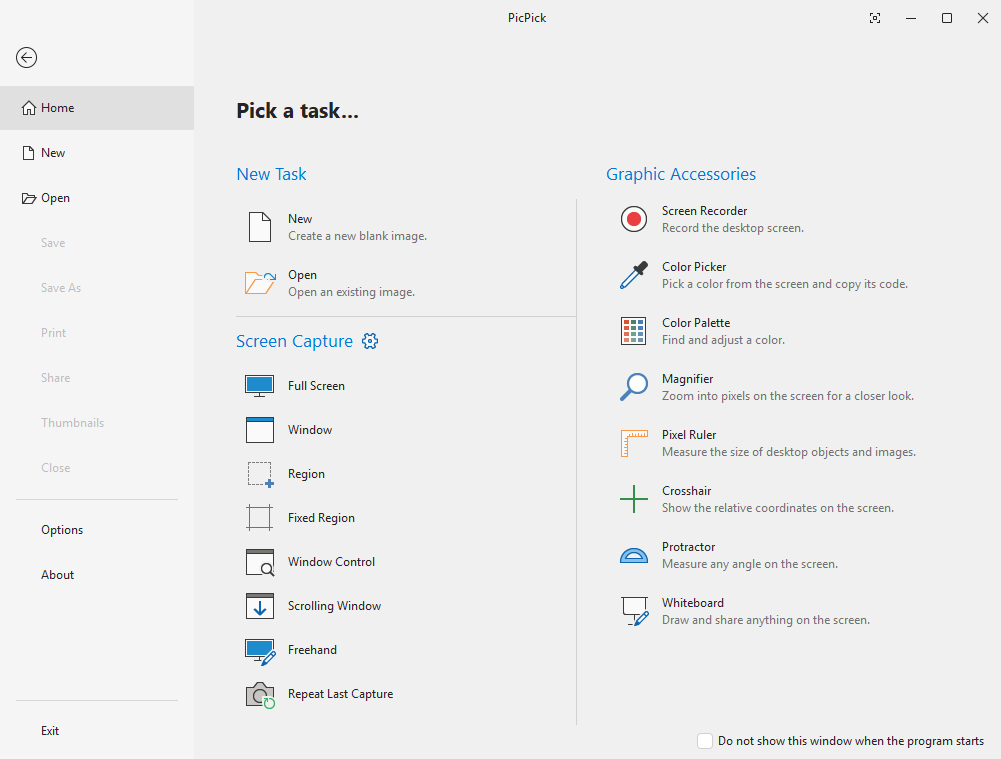
リリースノート
v7.6.2
- Improved Scrolling Window capture: adjust the scroll area before starting, see live progress while capturing, and get more reliable results.
- Added more frame styles, including a Torn Edge effect.
- Screen Recorder: added an option to turn off the countdown before recording starts.
- Screen Recorder: recording now continues without audio when an audio device cannot be opened.
- Screen Recorder: a clear message is shown when there is not enough memory or the output folder cannot be created.
- Fixed input errors in the color picker when an IME is active.
- Other minor bug fixes.
バージョン
安定版v7.6.2
Betav8.0.0-beta11
システム要件
オペレーティングシステムすべてのWindowsバージョン
アーキテクチャx86 / x64
RAM512 MB 以上
ストレージ~250 MB

Pro版
制限を解除して、機能はそのまま。
- 商用・業務利用
- 自動アップデート
- 優先テクニカルサポート
- 広告なし
Pro版を購入
購入済みですか? Pro版をダウンロード
リリースノート
v7.6.2
- Improved Scrolling Window capture: adjust the scroll area before starting, see live progress while capturing, and get more reliable results.
- Added more frame styles, including a Torn Edge effect.
- Screen Recorder: added an option to turn off the countdown before recording starts.
- Screen Recorder: recording now continues without audio when an audio device cannot be opened.
- Screen Recorder: a clear message is shown when there is not enough memory or the output folder cannot be created.
- Fixed input errors in the color picker when an IME is active.
- Other minor bug fixes.
バージョン
安定版v7.6.2
Betav8.0.0-beta11
システム要件
オペレーティングシステムすべてのWindowsバージョン
アーキテクチャx86 / x64
RAM512 MB 以上
ストレージ~250 MB